AstroCompass

Stargazing for iPhone

AstroCompass gold compass-star emblemAstroCompass

Find your place
among the stars.

Point your phone at the sky and it tells you exactly what you're looking at — every star, planet, constellation, and galaxy, computed live for exactly where you're standing. It works fully offline, day and night, nothing to configure.

Coming soon to the App Store

For iPhone · iOS 17 or later

Download on the App Store
QR code to download AstroCompass on the App Store
Scan to download
See the app
The real AstroCompass app in daylight, with the Sun, Mercury, Venus, and Arcturus labeled.
Sky Lock
342.0°N · NW
Sky Lock matches a photograph of the stars to the star catalog and aligns the map.
✓ Locked to the starsURSA MAJOR / THE BIG DIPPER
Sky Lock illustration · ESA Hipparcos stars

Sky Lock

The compass guesses.
The stars know.

Metal, power lines, even a magnetic phone case can pull a phone's compass off by several degrees. On a clear night, Sky Lock photographs the stars, matches the pattern against the Hipparcos catalog, and moves the map to where you are really pointing. The shift you see is the error your compass had.

  1. 01 Aim
  2. 02 Match
  3. 03 Lock

Inside the app

The sky has layers.

Real screens from AstroCompass.

Features

What it does.

01

Point and see

Hold your phone up and the screen shows the stars, planets, constellations, and deep-sky objects in front of you, day or night. Lie back and look straight up. Use the thumb slider to view celestial bodies thousands of light years away.

02

Sky Lock

On a clear night, aim at a patch of sky. The camera reads the stars, identifies them against the Hipparcos catalog, and snaps the map onto what you are really pointing at. When the stars and the phone's compass disagree, the stars win.

03

Satellites overhead

The ISS and hundreds of tracked objects, propagated on the phone from current orbital elements, so you know what to look for and when.

04

Celestial Events

Get notified of special celestial events when you start the app.

Right now, T Coronae Borealis is due to erupt. The app shows where to look tonight and can send an alert to your lock screen when it has erupted.

05

Sourced and verified

Every Science fact, every Skylore story, and every Nerd Fact carries its source. Star catalog by ESA (Hipparcos), ephemeris by astronomy-engine, orbits from CelesTrak, photos from NASA, credited on each page.

06

Easy and intuitive

Swipe the top menu to see additional categories. Search for your favorite star, planet or constellation and AstroCompass will guide you to it. Red night mode, large-text options, and other controls accessible in Settings.

The name

Ethos and story

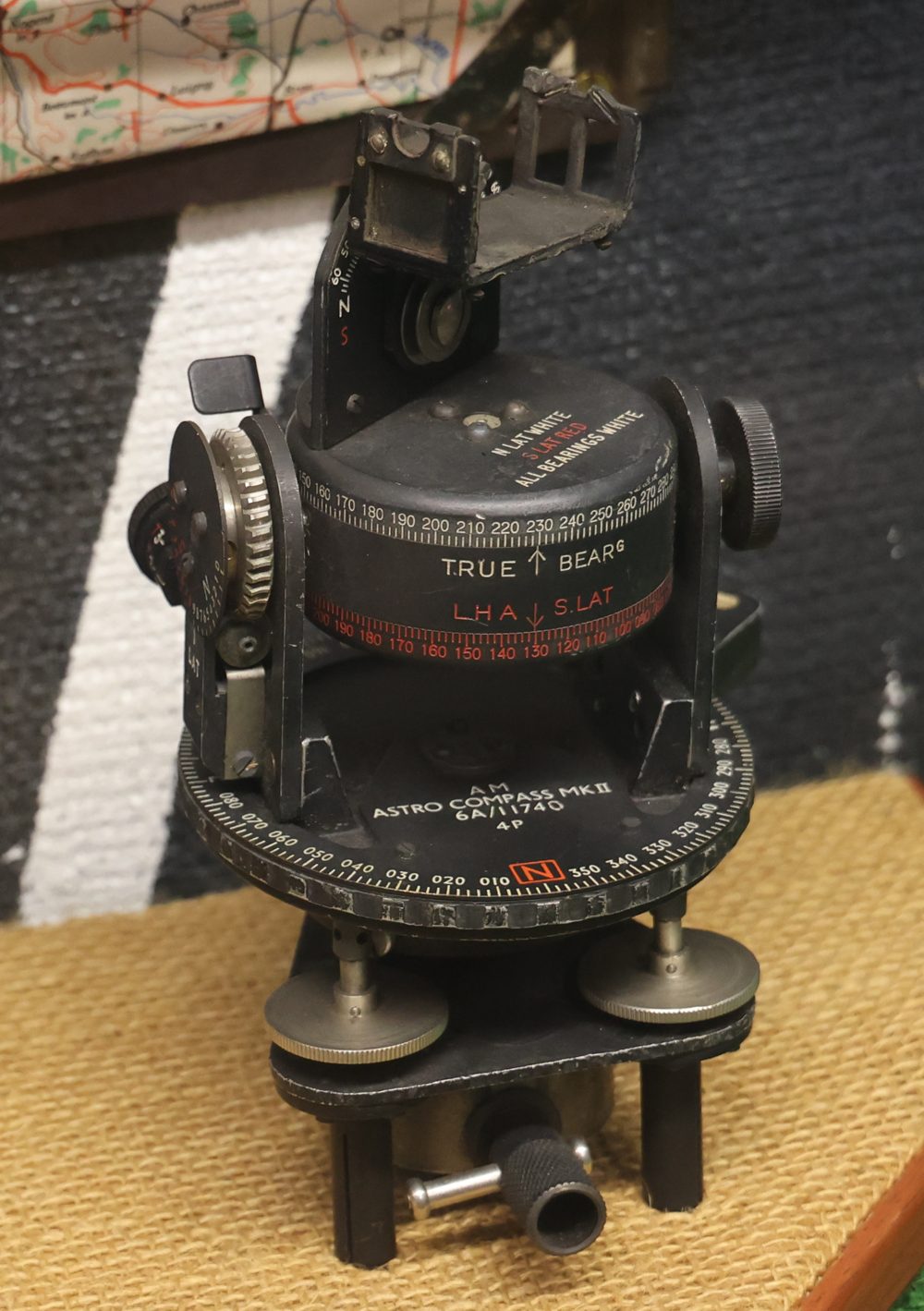
A WWII-era Astrocompass Mk II on display at the City of Norwich Aviation Museum
Astrocompass Mk II, City of Norwich Aviation Museum. Photo by Geni, CC BY-SA 4.0.

Historically, an astrocompass was a navigational tool used by sailors and pilots to find true north from the positions of stars, planets, and other astronomical bodies. It was valuable when magnetic compasses became unreliable, near Earth's magnetic poles or inside metal-hulled ships and aircraft. If the navigator knew the time and approximate location, the sky could provide true north without relying on magnetism. The astrocompass stayed in use until other tools took over: the periscopic sextant, inertial navigation systems, gyroscopes, and ultimately GPS in the 1990s.

Our smartphones use magnetometers, gyroscopes, and accelerometers to find north and build a digital compass. But that heading drifts and gets pulled around by other magnetic fields: power lines, electronics, even certain phone cases. A smartphone compass can be off by 2 to 10 degrees, and sometimes far more.

One of AstroCompass's main features is Sky Lock. On a clear, starry night, Sky Lock takes a picture of the sky, matches the star pattern, and anchors the app to the sky itself. From that moment the app is aligned to the actual stars, not to your phone's compass, and it keeps that star-true heading until the lock ends. You'll often see the sky visibly shift a few degrees the instant it locks; that's the error your compass had. Your phone's compass can still drift, depending on local magnetic interference, so just tap Sky Lock again to realign. It's the same process navigators used with the old astrocompass: the app knows the time and your location from GPS, and the stars do the rest.
Free and Plus

Start free.
Go deeper with Plus.

Available with the App Store release.

AstroCompass Free

The full sky map.

  • Sky map with stars to magnitude 8
  • The nearest 500 galaxies and Messier objects
  • Bright satellites and their pass alerts
  • All 88 constellations, eclipses, the comet, and stargazing score
  • 100 Nerd facts and 3 free Sky Locks

AstroCompass Plus ✦

Everything in Free, plus:

  • Unlimited Sky Lock
  • Every galaxy and every tracked satellite in the catalog
  • Stars to magnitude 9, more nebulae and star clusters
  • Rise alerts for saved objects
  • Every Nerd fact

Monthly and yearly plans include a 1-week free trial through Apple.

Only a successful Sky Lock uses a free lock. More about Free and Plus ↗

An honest note on accuracy

AstroCompass is a stargazing companion, not a navigation instrument. Its initial heading comes from your phone's sensors, which can be impacted by magnetic fields around you (powerlines, electronics, large and small metal objects, etc.) and can be corrected by the stars when Sky Lock succeeds. Please read the terms of use before relying on anything the app shows you.

Who makes it

AstroCompass is made by Dead Reckoning Studio in Colorado. Questions, bug reports, and star stories are welcome.

support@astrocompass.app